Serve a Project
The flowdash serve command scans a project directory, discovers components
and pages, and launches a Panel server with all routes configured.
Basic usage
This:
- Adds
my_project/tosys.path - Scans subdirectories for modules with
@register-decoratedappexports - Builds the component registry and specs
- Creates a
DashboardStoreatmy_project/dashboards.db - Serves the app on
http://0.0.0.0:5006
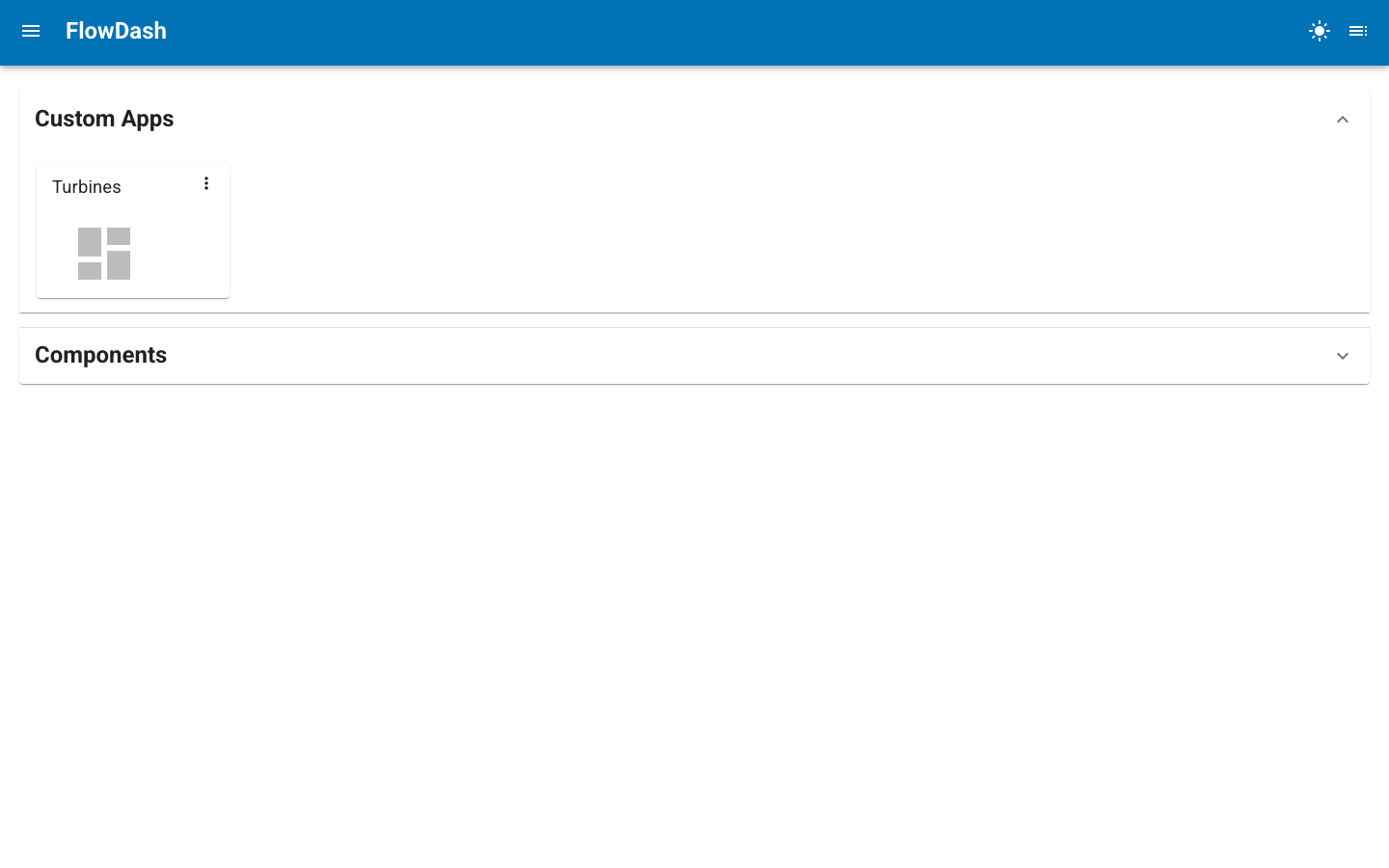
The landing page lists the project's pages and any saved dashboards. From here you can open a dashboard, or jump into the editor to build a new one.
CLI options
| Option | Default | Description |
|---|---|---|
--port |
5006 |
Port to serve on. |
--address |
0.0.0.0 |
Address to bind to. |
--title |
FlowDash |
Application title in the browser tab. |
--home-dashboard |
none | Dashboard (id or title) to show on the homepage instead of the grid. |
--db-path |
<dir>/dashboards.db |
Path to the SQLite database. |
--warm |
off | Import all modules at startup instead of lazily on first visit. |
--dev |
off | Enable autoreload for development. |
--admin |
off | Enable the Panel admin interface. |
--profiler |
none | Profiler to use (pyinstrument, snakeviz). |
--num-threads |
auto | Thread pool size. |
--allow-websocket-origin |
all | Restrict allowed websocket origins. |
--no-notifications |
off | Disable Panel notifications. |
--static-dirs |
none | Serve extra static file directories, e.g. --static-dirs assets=/path/to/assets. Paths are resolved relative to the project directory. |
--plugins |
none | Register extra Tornado routes from an importable module exposing a ROUTES list, e.g. --plugins my_plugin for <project>/my_plugin.py. Repeatable. |
flowdash serve is built on Panel's serve command and inherits its full
set of CLI options (OAuth, REST providers, session options, and more).
Run flowdash serve --help for the complete, up-to-date list.
Development mode
With --dev, the server reloads automatically when source files change.
Custom database location
By default, the dashboard database is created inside the project directory. Override this for shared deployments:
Homepage dashboard
By default the homepage (/) shows the launcher grid listing the project's
pages and saved dashboards. To land users directly on a specific dashboard
instead, pass --home-dashboard with either its id or its title:
The dashboard is resolved by id first, then by title. If it cannot be found, or the current user is not authorized to view it, the homepage falls back to the launcher grid. The grid remains reachable through the "Home" entry only when no home dashboard is configured, so use this for deployments centered on a single dashboard.
Running as a module
You can also run FlowDash without the entry point script:
Lazy loading and warm start
By default, page and component modules are imported lazily — on the first visit to that page or on first open of the component editor. This keeps startup fast even when individual modules have heavy dependencies.
Pass --warm to import all modules at startup instead:
Import errors are logged as warnings; they do not abort startup.
Project initialization file
If my_project/__init__.py exists, it is executed during server startup —
before registry scanning and before Panel launches. Use it for any
pre-configuration that the rest of the project depends on:
# my_project/__init__.py
import os
import panel as pn

os.environ.setdefault("DATABASE_URL", "postgresql://localhost/mydb")

# Register Panel extensions needed by your components (e.g. tabulator, vega, deckgl).
# FlowDash only calls pn.extension() with notifications enabled by default,
# so any additional extensions must be loaded here.
pn.extension("tabulator", "vega", sizing_mode="stretch_width")
The file runs with my_project/ already on sys.path and as the working
directory, so local relative imports work normally.
Page-aware sidebar and contextbar
FlowDashApp exposes two sidebar and contextbar parameters whose contents
are prepended to the app's own sidebar and navigation contextbar. To populate
them differently depending on which page is being served, define a
configure_layout function in the project __init__.py:
# my_project/__init__.py
import panel_material_ui as pmui


def configure_layout(app, content, route):
    """Set sidebar/contextbar contents for the page currently being served.

    Called on every navigation with:
      app     - the FlowDashApp instance (set app.sidebar / app.contextbar)
      content - the resolved view for this route (page, editor, or launcher)
      route   - the current pathname, e.g. "/", "/components", "/dash/<id>"
    """
    if route.startswith("/dash/"):
        app.sidebar = [pmui.Typography("Dashboard tools", variant="overline")]
        app.contextbar = []
    else:
        app.sidebar = []
        app.contextbar = []
FlowDash looks the function up by name after executing __init__.py, so the
name must be exactly configure_layout. It runs once per navigation, just
before the main area is rendered, and is responsible for both slots: whatever
you assign to app.sidebar / app.contextbar replaces the previous page's
contribution, so clear a slot by assigning []. Exceptions raised by the hook
are logged and do not break navigation.
The route argument distinguishes the built-in routes (/ for the launcher,
/components for the editor, /dash/<id> for a saved dashboard) from page
routes (/<Section>/<name>). Use content when the sidebar needs to reach into
the rendered view itself.
Project structure requirements
my_project/
    __init__.py             # optional startup hook (runs before server launch)
    SectionA/
        __init__.py         # optional
        component1.py       # must export `app`
        component2.py
    SectionB/
        page1.py
    .hidden/                # ignored (starts with .)
    _private/               # ignored (starts with _)
Each Python file must export an app attribute decorated with @register.
Files starting with _ are skipped. Directories starting with . or _ are
skipped.