Getting started
This tutorial builds a chat with a pydantic-ai agent, gives the agent a tool, and then docks it beside an existing app with AgentDrawer. It takes a few minutes and an API key for a model provider.
Install
panel-agents needs Python 3.12 or newer and Panel 1.11 or newer.
Any model pydantic-ai supports works; install its extra and change the model string below, for example to "openai:gpt-5".
A chat with an agent
AgentRunner runs a pydantic-ai agent and mirrors each run into a RunState. AgentChat renders that state: streaming messages, thinking and a card for every tool call. Save this as chat.py:
import panel as pn
from pydantic_ai import Agent

from panel_agents import AgentChat
from panel_agents.adapters.pydantic_ai import AgentRunner

agent = Agent("anthropic:claude-sonnet-5-5", instructions="You are a helpful assistant.")


@agent.tool_plain
def roll_dice(sides: int = 6) -> int:
    """Roll a die with the given number of sides."""
    import random
    return random.randint(1, sides)


runner = AgentRunner(agent)
chat = AgentChat(runner=runner, tool_labels={"roll_dice": "Roll a die"})

pn.ui.Page(title="Dice", main=[chat]).servable()
Serve it with panel serve chat.py --show and ask the agent to roll two dice. Each call appears as a card labelled "Roll a die", with its arguments and result, and once the run finishes the calls fold into one "2 steps" row you can expand. The runner keeps the conversation, so follow-up questions see the earlier turns.
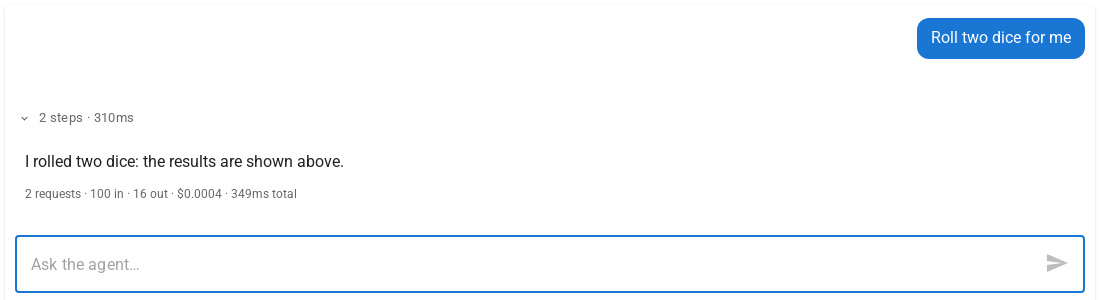
Because chat.py creates the runner at module level, panel serve gives each browser session its own runner and conversation.
Dock the agent beside an app
Most agents help with something the user is already looking at. AgentDrawer adds the chat as a collapsible drawer on the right of an existing app, together with views of the artifacts the agent publishes and the approvals it waits for. Here the app is a table, and the agent gets a tool to read it and one to filter it, which needs approval:
from dataclasses import dataclass

import pandas as pd
import panel as pn
from pydantic_ai import Agent, RunContext

from panel_agents import AgentDrawer, ApprovalPolicy
from panel_agents.adapters.pydantic_ai import AgentRunner

DATA = pd.DataFrame({
    "region": ["North", "South", "East", "West"],
    "revenue": [120_000, 95_000, 143_000, 88_000],
})


@dataclass
class Deps:
    table: pn.widgets.Tabulator


agent = Agent(
    "anthropic:claude-sonnet-5-5", deps_type=Deps,
    instructions="You help the user with the revenue table they are looking at.",
)


@agent.tool
def get_table(ctx: RunContext[Deps]) -> list[dict]:
    """The rows currently shown in the table."""
    return ctx.deps.table.value.to_dict("records")


@agent.tool
def filter_regions(ctx: RunContext[Deps], regions: list[str]) -> str:
    """Show only the given regions in the table."""
    ctx.deps.table.value = DATA[DATA.region.isin(regions)]
    return f"Showing {', '.join(regions)}."


table = pn.widgets.Tabulator(DATA, show_index=False, sizing_mode="stretch_width")
runner = AgentRunner(agent, deps=Deps(table), approval_policy=ApprovalPolicy(["filter_*"]))
drawer = AgentDrawer(runner, main=table, title="Assistant", open=True)

pn.ui.Page(title="Revenue", header=[drawer.toggle], main=[drawer]).servable()
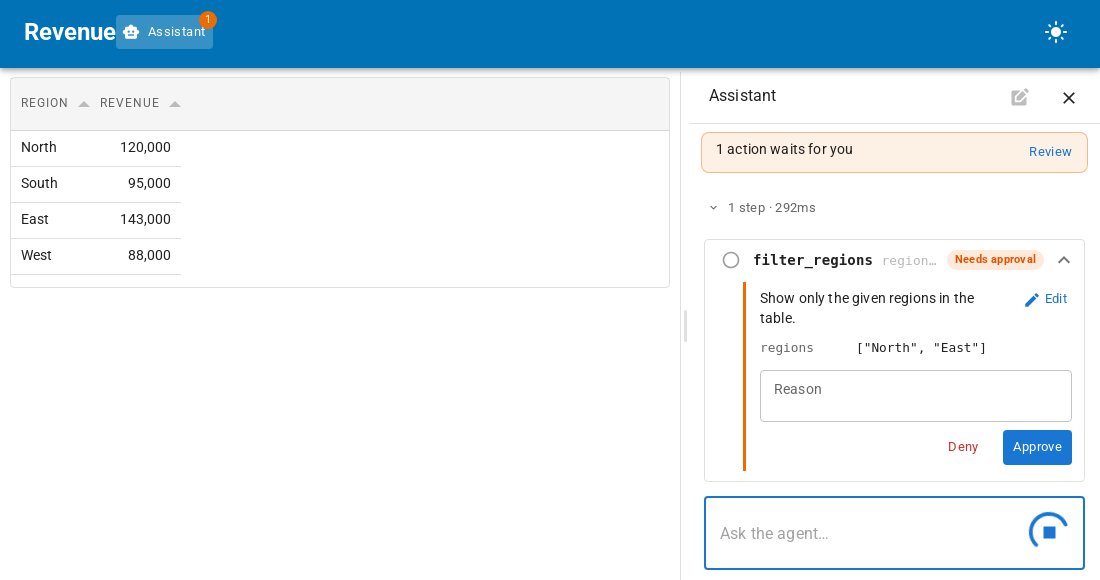
Ask the assistant to show only the regions above 100k. It reads the table, then pauses on filter_regions: the card in the chat shows the arguments, which you can edit before approving or denying. While the drawer is closed, the badge on drawer.toggle in the header counts the pending approvals. When you approve, the run continues as the same run and the table updates.
Next steps
- Dock an agent beside an existing app covers the drawer's variants, the contextbar and its accessibility.
- Require approval for tool calls explains
ApprovalPolicyrules and who may approve. - Edit documents with versions shows how an agent edits app state as a versioned document you can apply and revert.
- Let the agent act on the page registers typed front-end actions instead of plain tools.
- Examples lists complete apps, including a SQL analyst with recordings and replay.