Require approval for tool calls
A tool call that needs approval pauses the run until a person approves, edits or denies it in an ApprovalCard. The run then continues as the same run, and the decision is recorded as an APPROVAL_RESOLVED event, so it appears in recordings and in an AuditLog.
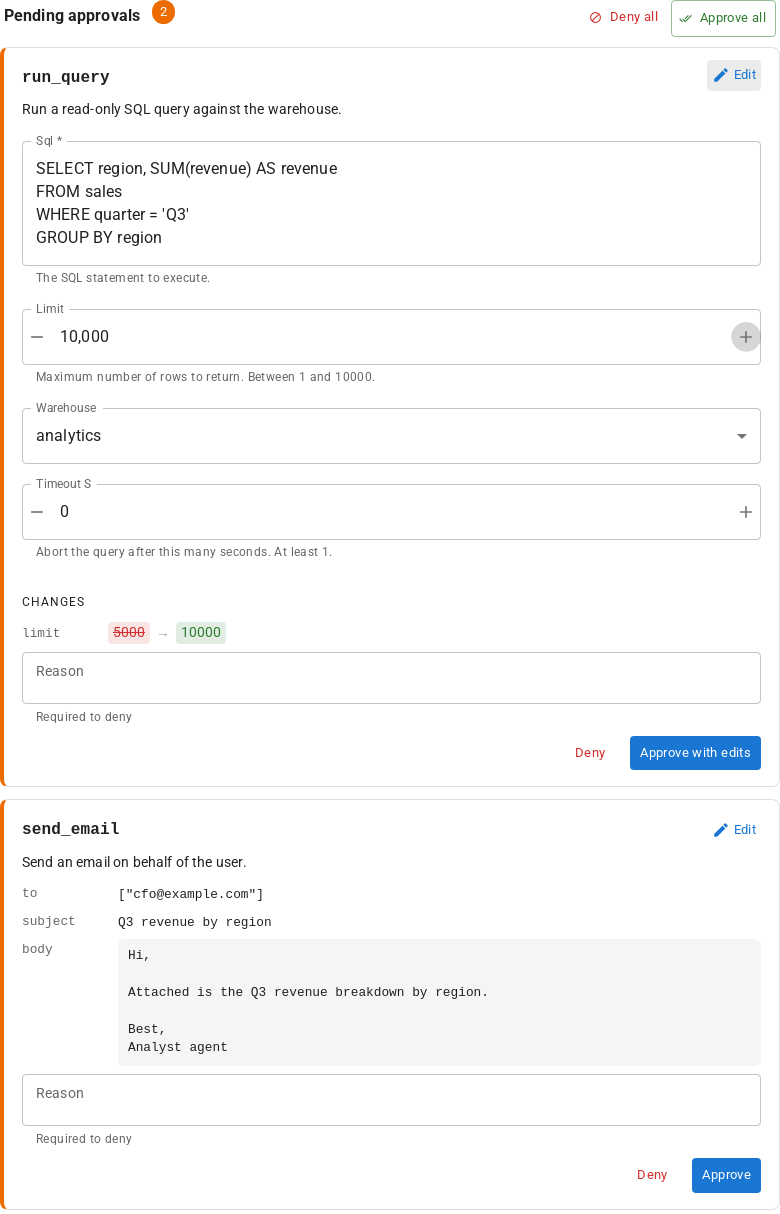
There are two ways to ask for approval. A tool can ask for itself, with pydantic-ai's requires_approval=True or by raising ApprovalRequired. Or the app declares an ApprovalPolicy, which keeps the decision of what needs review out of the tools and also covers tools you did not write, such as front-end actions or MCP toolsets.
Declare a policy
A policy is an ordered list of rules. The first rule matching a call decides, and calls that match no rule run without review.
from panel_agents import ApprovalPolicy, ApprovalRule

policy = ApprovalPolicy([
    "save_dashboard",
    "delete_*",
    ApprovalRule("run_sql", when=lambda args: not args["sql"].lstrip().lower().startswith("select")),
    ApprovalRule("publish_dashboard", approvers={"alice", "bob"}),
])
- A string is a rule requiring approval for every call to that tool. Tool names may be glob patterns.
whenis a predicate on the call arguments, as the tool will receive them, with defaults filled in. The rule only applies when it returns True. A predicate that raises counts as True, so a mistake asks for approval instead of skipping it.approverslimits who may decide: a collection of user names, or a callable(request, user) -> bool, for example to check a role.useris None when the app has no authentication, so a callable should handle that, for examplelambda request, user: user is not None and user.endswith("@example.com"). A callable that raises denies. Leavingapproversout lets anyone decide.
Apply it to an agent
Pass the policy to the AgentRunner. It wraps the toolsets the agent calls during a run with pydantic-ai's ApprovalRequiredToolset, so the tools themselves stay unchanged. Tools that the model provider runs itself, such as built-in web search or code execution, never pass through a toolset and are not covered. The policy sees each tool's own name, before any prefix a PrefixTools capability adds.
from panel_agents import AgentChat
from panel_agents.adapters.pydantic_ai import AgentRunner

runner = AgentRunner(agent, deps=deps, approval_policy=policy)
chat = AgentChat(runner=runner)
AgentChat picks up policy.can_approve from the runner, so the approval cards in the chat disable their buttons for users the policy does not allow, and explain why. The user is pn.state.user unless a card is given one. For an ApprovalQueue outside the chat, pass the hook yourself:
from panel_agents import ApprovalQueue

queue = ApprovalQueue(runner.state, can_approve=policy.can_approve, require_reason="deny")
Requests that no rule matches, such as those from a tool that raises ApprovalRequired itself, can be decided by anyone.
Action labels
The cards say "Approve" and "Deny" by default. When an approval is not about a tool call as such, for example a step of a plan the agent proposed, give the rule other words. They are recorded on the ApprovalRequested event, so a replayed session shows the same buttons.
policy = ApprovalPolicy([
    ApprovalRule("plan_step", labels={"deny": "Remove", "denied": "Removed"}),
    "run_sql",
])
The plan steps now show "Approve" and "Remove", once decided they read "Removed", and the tool-call card's badge says "Removed" instead of "Denied". The run_sql cards keep "Approve" and "Deny". An ApprovalQueue names its batch buttons "Approve all" and "Remove all" while every pending request is a plan step. The deny action keeps its red text style, which suits a removal as well.
A changed approve or deny must come with its past tense, approved or denied, since it is shown once the request is decided; leaving it out raises ValueError. The rest is derived: approve_all and deny_all append "all", and approve_edited and approved_edited append "with edits", which reads well when approve and deny are single verbs. Give any of them explicitly otherwise, for example "deny_all": "Remove all steps", and edit names the edit toggle.
Labels on a rule are the main way to set them, because they travel with the request to every place it is shown, including the tool-call card in the chat. ApprovalCard and ApprovalQueue also take labels, applied under the request's own, for an app that wants different words on every card. These do not reach the tool-call card's badge, nor the cards inside AgentChat and AgentDrawer, which build their own; use a rule there. A tool that asks for approval itself, with requires_approval=True or ApprovalRequired, matches no rule and so gets the component labels or the defaults.
Who may approve is enforced, not only shown
The cards use can_approve to disable their buttons, but the decision is checked again where it takes effect, and the RunState is the only arbiter:
RunState.resolve_approvalraisesPermissionErrorwhen the runner's policy does not allow the user to approve or to deny the call. A decision applied to the state some other way, for example as a rawApprovalResolvedevent, is ignored unless the policy allows it, and the request stays pending.- When a person edits the arguments, the edit is validated with the tool's own validator first, so defaults, nested defaults and transforming validators are applied, then the proposed and the validated edited arguments must both allow the user. Editing
SELECTintoDELETE, or leaving out an argument whose default needs an admin, cannot move a call past its rule. Arguments the tool would reject raiseValueError. - Each request is decided once.
resolve_approvalraisesValueErrorfor a request that was already decided, later events for it are ignored, and the runner acts only on the decision the state kept.