Arrange the chat
AgentChat shows the RunState of a runner as a chat feed and passes what the person types to runner.run. Its parameters decide where messages sit, what each message shows and whether the feed reads as a conversation or as a document. In an AgentDrawer, pass them through chat_params.
Place the messages
By default the person's messages sit on the right as bubbles and the agent's on the left. user_placement moves the person's messages, and message_params are passed to every ChatMessage the chat builds:
import panel as pn

from panel_agents import AgentChat

chat = AgentChat(
    runner=runner,
    user_placement="left",
    message_params={"show_avatar": False},
)

pn.ui.Page(title="Ask an agent", main=[chat]).servable()
{"show_avatar": False, "show_user": False} leaves out who sent each message. The chat keeps control of visible, since it hides and shows messages as a run streams and its steps fold, and adds any css_classes you give to its own. Changing either parameter builds the messages already shown again.
The person's messages are the ones shown under user ("User" by default), and the agent's are shown under the run's agent name, or assistant when the run has none. avatars maps those names to an emoji, text or image URL, e.g. {"User": "🙂"}, and placeholder sets the input's placeholder.
Read the chat as a document
With layout="document" the feed is a wide centred column with every message on the left, and the artifacts a run published render inline as ArtifactCells in a row after the run's messages. This suits an agent whose answers are mostly tables, charts or reports:
chat = AgentChat(
    runner=runner,
    layout="document",
    inline_artifacts=lambda artifact: artifact.kind == "table",
    cell_renderer=lambda artifact: pn.widgets.Tabulator(artifact.value, disabled=True, show_index=False),
    max_cells=4,
)
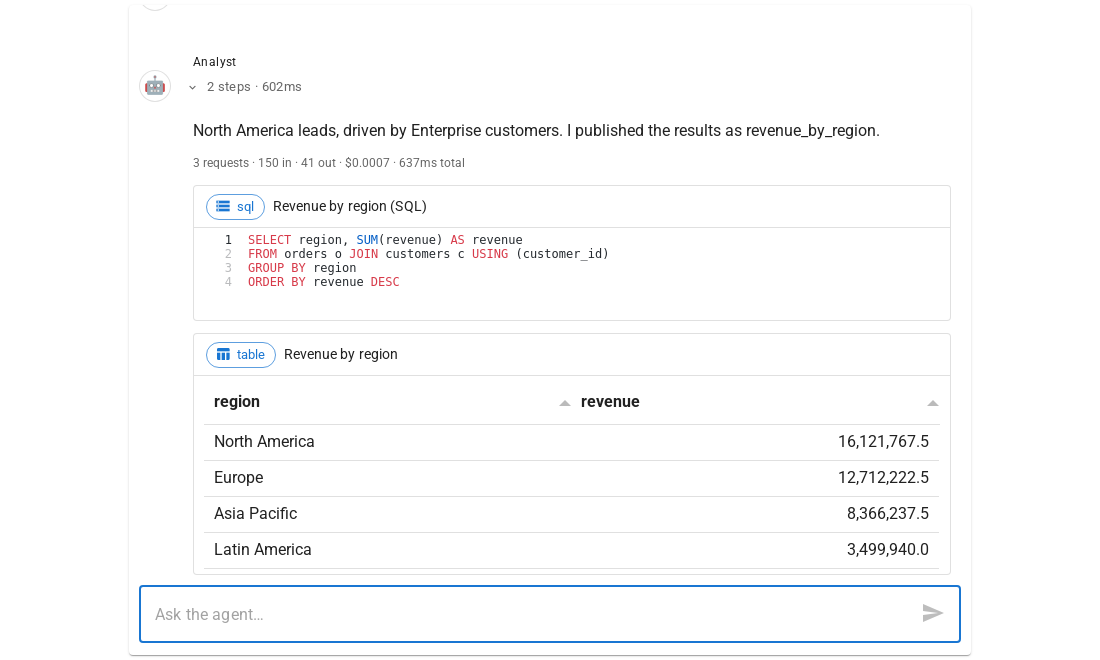
layout is set once, when the chat is created. inline_artifacts chooses which artifacts get a cell; by default every artifact that is not a document, since a document already lives in the app. The tool calls that published an inline artifact need no chip of their own and fold into the run's step group. cell_renderer renders a cell's body, by default with the renderers registered through register_renderer. A cell shows the latest version and renders again when a new one is published. A run that publishes more than max_cells artifacts shows the rest behind a "Show more" button. chat.cells maps artifact ids to the cells built so far.
user_placement="right" puts the person's messages back on the right as bubbles in the document layout too. Cells can offer actions such as "Add to dashboard", see Offer actions on artifacts.
Send text from code
await chat.submit(text) sends text as if the person had typed it, for example from a list of example questions, and writes any mentions in the input at its start. It does nothing while a run is in progress.
button = pn.ui.Button(label="Which region sold most?", variant="text")


async def ask(event):
    await chat.submit(button.label)


button.on_click(ask)
Without a runner, callback receives the submitted text instead, and the chat adds it to the state as a user message first unless add_user_message=False. AgentChat(state, readonly=True) shows a state without an input, for example one replayed with load_state.