Edit documents with versions you can apply and revert
Most artifacts are outputs: a query result, a chart, a report. A document artifact instead mirrors something the host app owns and the agent edits, such as a configuration, a dashboard or a form. Each edit the agent makes is published as a new version, the user can compare any two versions, and the artifact view offers to apply an earlier or later version back to the app.
Publish versions as applied
A tool that edits the document in place publishes what the document now holds with applied=True:
from pydantic_ai import RunContext

from panel_agents.adapters.pydantic_ai import publish_artifact

@agent.tool
async def set_title(ctx: RunContext[Deps], title: str) -> str:
    """Rename the dashboard."""
    ctx.deps.dashboard.title = title
    await publish_artifact(ctx, "dashboard", ctx.deps.dashboard.to_dict(), kind="dashboard", title="Dashboard", applied=True)
    return "Renamed."
artifact_return(..., applied=True) does the same from a sync tool. An artifact with an applied version is a document: artifact.is_document is True, artifact.applied is the number of the version the host holds (a read-only parameter you can watch), and artifact.applied_version is that ArtifactVersion. Version numbers count from 1 everywhere they are public, as in the v1, v2 labels the user sees: ArtifactVersion.version, Artifact.current, ArtifactView.base and target, apply_version(version) and the ARTIFACT_APPLIED event all use them. A tool that only proposes a change publishes without applied, and the version waits for the user to apply it.
Apply and revert from the artifact view
Give the ArtifactPane (or a single ArtifactView) the RunState and an on_apply callback that makes the host document match a version:
from panel_agents import ArtifactPane

def apply_version(artifact, version):
    dashboard.load(version.value)

pane = ArtifactPane(state=runner.state, on_apply=apply_version)
When the user selects a version of a document in the history (see below), a bar below the header says which version is shown and offers "Revert to vN" for versions before the applied one and "Apply vN" for versions after it. Clicking it calls on_apply(artifact, version) with the Artifact and the ArtifactVersion to apply, and the callback may be async. If the callback raises or returns False, the message is shown and nothing changes. Otherwise the pane records an ARTIFACT_APPLIED event through RunState.apply_artifact_version, so recordings and replays show which version was live. The button is disabled while the callback runs, so a double click cannot apply twice. ArtifactView.apply_version(version) does the same from code, taking a version number, and raises if there is no on_apply or no such version.
Applying does not create a version. The compare tab compares new versions of a document with the applied one, so after a revert the agent's next edit is shown against what the host actually holds. An AgentRunner also tells the model: the next prompt it sends starts with a short note such as "ann applied version 1 of the artifact 'Dashboard' (dashboard)", so the agent does not keep building on a version that is no longer live.
Publish the host's own edits
When the user changes the document outside the agent, for example with the app's own widgets, publish the new state so the versions stay truthful:
RunState.publish_artifact records an ARTIFACT_PUBLISHED event like a tool would, and an AgentRunner mentions the new version to the model on its next prompt.
Who made a version
Every ArtifactVersion records who made it: run_id is the run it was published in, tool_call_id the tool call if a tool published it, actor who made it ("agent" or "user", or any string a host chooses, such as "import") and user the person's name when a person made it. The ARTIFACT_PUBLISHED event carries the same fields, so a replayed recording shows the same authors.
Versions a tool publishes through publish_artifact(ctx, ...) or artifact_return(...) get the run, the tool call and the actor "agent"; the agent's name is on the run, state.runs[version.run_id].agent_name. RunState.publish_artifact fills them in from where it is called:
- from code an
AgentRunnerruns, such as a document method a tool calls, the current run and tool call with the actor"agent"; - inside
RunState.user_run, that run, the actor"user"and its user; - anywhere else, such as a widget callback, the actor
"user"andpn.state.user, with no run.
Each can be passed explicitly instead, e.g. state.publish_artifact("dashboard", value, applied=True, actor="import"). An actor other than the current one keeps the run but not its tool call or user, and the actor "user" always gets pn.state.user unless a user is given. A widget callback that fires while the agent is running is still the user's: the run is only visible to code the run itself calls. An AgentRunner tells the model about every version it did not make itself with its next prompt, including a person's edits made while it was running. Recordings made before versions recorded their actor load versions published by a tool call as the agent's.
Free-form metadata describes what a version did. A host editing a document one operation at a time can publish a version per operation:
def place_tile(name, width):
    dashboard.place(name, width)
    state.publish_artifact(
        "dashboard", dashboard.to_dict(), applied=True,
        metadata={"op": "place_tile", "args": {"name": name, "width": width}},
    )
Called from an agent's tool, place_tile publishes an agent version stamped with that tool call; called from the app's own widgets, a user version.
Group a person's edits into a run
Agent versions are grouped by the run that made them. To group a batch of a person's edits the same way, wrap them in RunState.user_run:
with state.user_run("Arranged the tiles") as run_id:
    place_tile("revenue_chart", 50)
    place_tile("note", 50)
It emits RUN_STARTED with the user as agent_name and the given input, and RUN_FINISHED when the block ends. A block that raises is still recorded as a finished run, since the edits made before the error stand. A user run has no messages and no model calls. Versions published inside it default to the run, the actor "user" and the user, which defaults to pn.state.user and can be passed as user=. It is meant for a synchronous batch of edits: a top-level user run makes the state count as running while the block is open, which disables the chat input, so do not await inside it. For edits spread over a longer time, pass the same run_id to each publish_artifact call instead. Called from code a run executes, such as a tool, user_run starts a child run of that run (parent_run_id) and the versions in it keep the enclosing attribution, so an agent's tool that groups its edits this way still publishes them as the agent's, and a user= passed there is ignored. A run_id that already names a run of the state raises ValueError.
Run and tool call ids
Inside a tool, pydantic-ai's RunContext has the ids as ctx.run_id and ctx.tool_call_id. Host code that a tool calls without passing its context reads them with current_run_id() and current_tool_call_id():
from panel_agents import current_run_id, current_tool_call_id

class Dashboard:
    def place(self, name, width):
        self.history.append({"op": "place_tile", "run_id": current_run_id(), "tool_call_id": current_tool_call_id()})
        ...
AgentRunner sets the run id while it drives the agent, including output functions, and the tool call id while each tool executes. The prompt's user message is recorded before the run id is set and the error recorded when a run is cancelled after it, so neither belongs to code that sees the id. The ids reach sync tools, which pydantic-ai runs through anyio.to_thread.run_sync, and actions an ActionToolset hands to the Panel session; do not rely on them in threads you start yourself. RunState.user_run sets the run id of its block. Outside them both return None.
They are backed by a context variable, so they follow awaited code and the tasks it starts, but not callbacks triggered independently, which keeps a person's concurrent edits from being attributed to the agent. Two consequences follow from that. Code that reacts to the run's own events, such as a RunState.subscribe callback or a param watcher that fires while the runner applies an event, runs inside the run and publishes as the agent. A task a tool starts keeps the tool's ids even after the run has ended. From outside the run, AgentRunner.run_id is the id of the current or last run, AgentRunner.running says whether it is in progress, and RunState.runs maps every run id to its RunInfo.
Browse the history
The artifact view lists the versions in a history grouped by the run that made them, newest first. It opens by default for documents, so in an AgentDrawer the artifacts view shows it right away; for other artifacts the history button in the header opens it, and ArtifactView(history=True) opens it from code. The header shows the artifact's title and number of versions, with icon buttons for Undo, Redo, the history and Download.
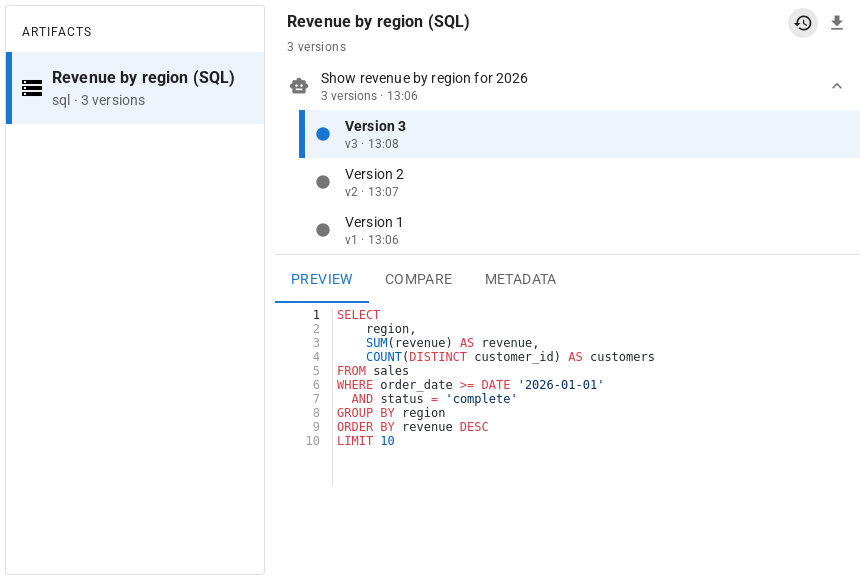
A run that made several versions is a group headed by the run's input, the question the user asked, with its number of versions and time; a run that made one version is a single row with the question as its title and the version below it. A run made with RunState.user_run shows its input too; other edits by a person read "You edited" for the person viewing and "ann edited" for anyone else. Versions made outside a run are grouped while the same person keeps editing, and a person's edit made while an agent ran sits between the agent's versions before and after it. The latest group is open and older ones are folded. A folded group sends and renders no rows until it is opened, and an open group shows its latest 50 versions with a "Show 50 more" row below them, so the cost of an update grows with the number of runs and the rows people open rather than with the number of versions. With 500 versions in 100 runs, the drawer loads in about half a second and opening a run or viewing a version takes a few hundred milliseconds.
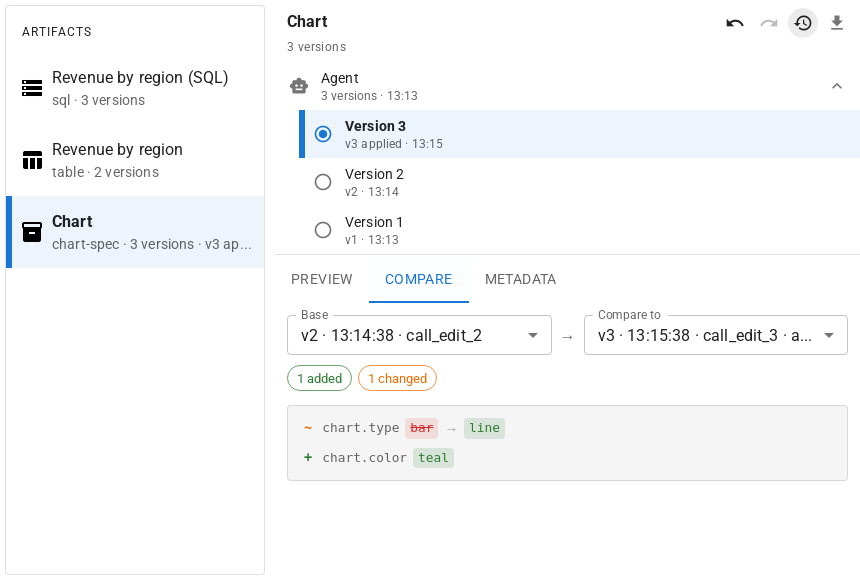
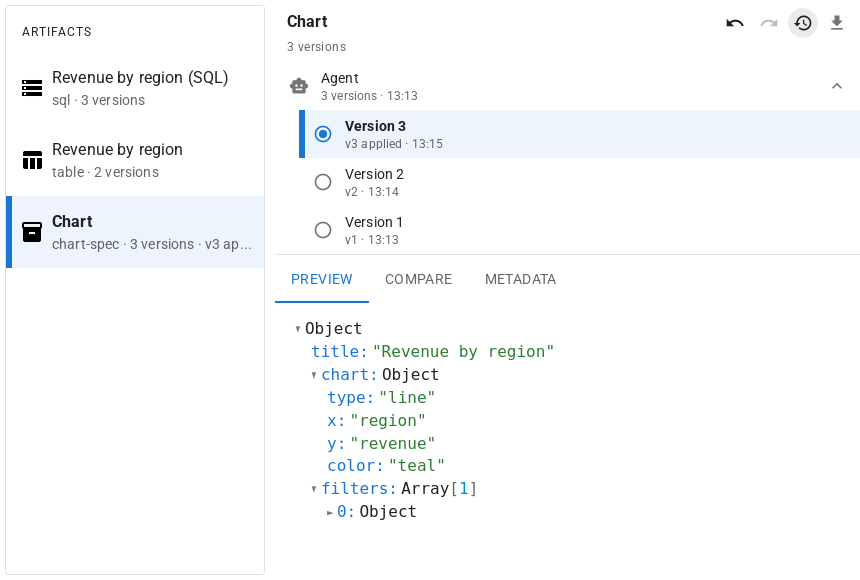
A row shows the version's operation, its number and time, and marks the applied version ("v3 applied") with a coloured icon. Clicking it shows that version without applying it, and the Compare tab then compares it with the applied one. The operation label comes from the version's metadata:
metadata["label"]: a sentence for people, e.g."Placed revenue_chart at half width";- otherwise
metadata["op"]: the operation's name, e.g."place_tile"; - otherwise
"Version 12".
Publish both when you have them; the label is shown and op stays available to the host. A version made of many changes reads best with a short label such as "Added 8 components and 7 connections" and the full list in metadata["detail"] (a string or a list of strings), which the row shows in its tooltip after the label.
Undo and redo
For a document with an on_apply callback the header has Undo and Redo buttons, and the history a restore button on every row that is neither applied nor the one shown (shown on hover or focus, taking no space otherwise), and an undo button on each run that changed the applied version, up to the applied one ("Undo run" and "Go back to before this run"). They all move the applied version through on_apply and record an ARTIFACT_APPLIED event, so no version is ever changed or removed and a replayed recording shows the same history. The same commands exist in code:
await view.undo()            # back to the version applied before the last change
await view.redo()            # forward again
await view.undo_run(run_id)  # back to what the host held before the run changed it
await view.redo_run()        # forward again through the whole run in one step
await view.apply_version(3)  # restore one version
view.can_undo and view.can_redo say whether the buttons are enabled, and artifact.undo_version, artifact.redo_version and artifact.redo_run_version name the versions they would apply. Each returns whether the version was applied, so a refusing on_apply leaves everything as it was.
The same commands exist on RunState, for editors and command palettes that offer undo without an artifact view. They record the same events, so a recording does not show whether a view or the host made the step:
def load(artifact, version):
    editor.load(version.value)  # raise or return False to refuse

state.undo("doc", on_apply=load)
state.redo("doc", on_apply=load)
state.undo_run("doc", run_id, on_apply=load)
state.redo_run("doc", on_apply=load)
Each returns the applied ArtifactVersion, or None when there was nothing to do or on_apply refused; the applied version also becomes artifact.current, live and in a replay. on_apply is optional, for a host that follows artifact.applied instead, and must be synchronous here; the view awaits an async one.
What counts as a change follows the order in which versions were published and applied, which is what the ARTIFACT_APPLIED events record (their action is "undo", "redo" or None):
- Publishing an applied version, and applying a version by hand ("Apply", "Revert to", a row's restore), are changes. Undo goes back to the version that was applied before, so undoing a revert returns to where the revert started. Each version appears once in the undo history, where it was last applied, so applying a version again by hand moves it there and undo never steps through the same version twice. Undo therefore does not step back to a version that was applied again later: after v1, v2, v3 and a revert to v1, undo goes to v3, then v2, and stops there, and v1 is reached again by redo. Recordings made with panel-agents 0.1.0b4 or earlier replay to the same applied versions, but where the session reverted by hand their undo and redo targets can differ from what that session offered.
- Undoing a run goes back to the version the host held before the run first published an applied version, in one step; proposals published before or during the run are skipped. A run that only proposed versions has nothing to undo and
undo_runraisesValueError. A run that is undone already, because what the host held before it is applied or only reachable by redo, is left alone:undo_runreturns None, or False on the view, without callingon_apply. Redo then steps forward through the undone versions one at a time, andredo_runredoes the whole undo at once, also after some of it was redone.redo_run(run_id)redoes from the earliest undo that undid a version of that run, with every undo after it since redo is linear, so none of the run's versions is left to redo. - Publishing a new applied version, or applying a version by hand, ends redo, as in a text editor; a proposal does not, since the document did not change.
- A run is not undone over later edits: if a version made outside the run, by a later run or with no run (a person's edit while the agent ran, or the same person's next batch of edits), came after the run's first change, undoing the run would take that version back too, so
undo_runreturns None (False on the view) without callingon_applyandartifact.undo_run_blocked(run_id, state.runs)is True. The history then offers no undo for the run and shows a muted indicator whose tooltip reads "Later edits came after this run; undo them first"; the same holds for a group of edits made without a run.undostill steps back one version at a time.redo_run(run_id)likewise returns None when the undos it would redo include a version made outside the run.
Keep the history across sessions
A HistoryRecorder writes the version history of documents to any sink a Recorder takes: a JSON Lines file, a text stream or a callable receiving each record, with values encoded by the same codecs. It keeps the ARTIFACT_PUBLISHED and ARTIFACT_APPLIED events of the artifacts you name and the start and end of each run that published one of their versions, so the history keeps its grouping and questions; messages, tool calls and other runs are left out. load_history restores such a file into a state:
import os

from panel_agents import HistoryRecorder, load_history

path = f"history/{dashboard_id}.jsonl"
if os.path.exists(path):
    load_history(path, state)
recorder = HistoryRecorder(state, path, artifact_ids=["dashboard"])
load_history applies the stored events without notifying the state's subscribers, so a recorder already attached does not write them again and an AgentRunner does not tell the model about versions it saw in an earlier session. Use RunState.apply_many(events, notify=False) the same way for events stored elsewhere. To store the history in a database, pass a callable sink and give load_history the stored records in order.
A RunState keeps every event it applied in state.events, which grows without limit in a long editing session. Once a recorder keeps the log, cap what stays in memory with RunState(max_events=1000). The state is built as events arrive, so dropping old ones changes nothing you see, and undo and redo still work; only state.events stops being a full log once state.dropped_events is above zero, so replay the recording rather than state.events.
The versions of a document hold their values, so an artifact edited for hours holds every state of the document. state.drop_artifact_versions("dashboard", before=n) drops the values of the versions numbered below n, except the applied one, for example to keep the latest few hundred. The values are freed once nothing else holds them; state.events holds the events that published them, so set max_events as well:
artifact = state.artifacts["dashboard"]
if len(artifact.versions) > 550:
    state.drop_artifact_versions("dashboard", before=len(artifact.versions) - 500 + 1)
A dropped version keeps its object, number, run, author, metadata and time, so version numbers never shift and code holding a version or its number stays valid, but its value is None, version.dropped is True and it cannot be applied. Dropped versions leave the undo and redo history, so undo stops at the oldest version kept, and the artifact view leaves them out of its history and compare lists. Only documents can drop versions; for any other artifact it raises ValueError. The drop is recorded as an ArtifactVersionsDropped event, which a HistoryRecorder writes too, so a replay drops the same versions.
Describe changes semantically
The compare tab picks a diff strategy by artifact kind. Text kinds get a line diff and tables a cell diff. For structured documents, register a strategy that returns a StructuredDiff, a list of Change(op, path, old, new, label) records. diff_structured computes the changes between two nested dict and list values. A change's path is a tuple of the keys and list positions leading to it, such as ("nodes", "sales", "config"), so keys containing dots stay unambiguous, and path_str renders it for display. A strategy can relabel the changes in the document's own terms:
from panel_agents.artifacts.diff import diff_structured, register_diff

@register_diff("dashboard")
def diff_dashboard(old, new, **options):
    result = diff_structured(old, new)
    for change in result.changes:
        if len(change.path) == 2 and change.path[0] == "nodes" and change.op != "change":
            name = change.path[1]
            change.label = f"Node {name!r} {'added' if change.op == 'add' else 'removed'}"
    result.old_text, result.new_text = to_yaml(old), to_yaml(new)
    return result
The view lists the changes, showing the label when there is one and otherwise the path with the old and new values. When old_text and new_text are set, a Text tab next to the change list shows the line diff of the serialized versions. examples/artifacts_demo.py shows a document artifact with a custom diff and an on_apply callback.