Build Your Own Form
When you want validation, grouping or submit behaviour that OpenAPIForm does
not offer, the introspection it is built on is public. Use the helpers directly
and keep only the schema-reading part.
The four helpers
from panel_openapi import collect_fields, get_operation, load_openapi, schema_to_widget

openapi = load_openapi(spec)                            # parse and validate
operation = get_operation(openapi, "/orders/{orderId}", "put")   # one operation
fields = collect_fields(openapi, operation)             # flatten to fields
widget = schema_to_widget(field.name, field.schema, field.required)
load_openapi accepts a URL, dict or parsed model. get_operation raises
KeyError naming what is available when the path or method is not defined, and
merges in any parameters declared on the path item.
What a Field carries
collect_fields flattens parameters and JSON body properties into one ordered
list, so you do not have to walk the document or resolve $ref yourself:
| Attribute | Meaning |
|---|---|
name |
The field name, and the key in the request |
location |
"path", "query", "header" or "body" |
schema |
The resolved schema, with $ref followed |
required |
Whether the operation requires it |
read_only |
Whether it is server-assigned, and so must not be sent |
Pass skip_read_only=True to drop read-only fields rather than have them
returned flagged.
Complete example
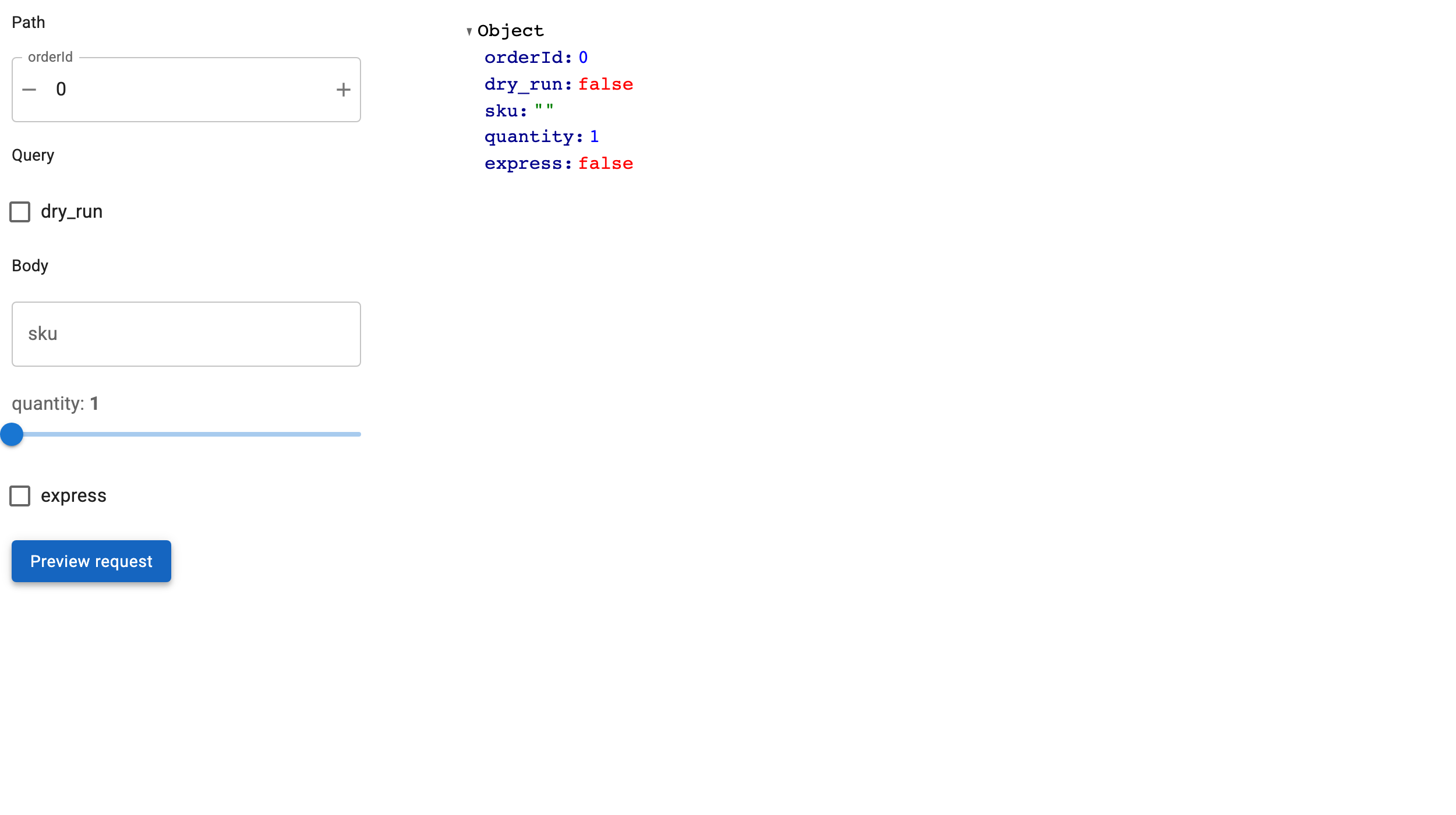
Grouped by location, with a request preview instead of a request:
"""Use the introspection helpers directly and build the form yourself."""

import panel as pn
import panel_material_ui as pmui

from panel_openapi import collect_fields
from panel_openapi import get_operation
from panel_openapi import load_openapi
from panel_openapi import schema_to_widget

pn.extension()

SPEC = {
    "openapi": "3.0.0",
    "info": {"title": "Orders", "version": "1.0.0"},
    "paths": {
        "/orders/{orderId}": {
            "put": {
                "summary": "Replace an order",
                "parameters": [
                    {
                        "name": "orderId",
                        "in": "path",
                        "required": True,
                        "schema": {"type": "integer"},
                    },
                    {"name": "dry_run", "in": "query", "schema": {"type": "boolean"}},
                ],
                "requestBody": {
                    "content": {
                        "application/json": {
                            "schema": {
                                "type": "object",
                                "required": ["sku"],
                                "properties": {
                                    "sku": {"type": "string"},
                                    "quantity": {
                                        "type": "integer",
                                        "minimum": 1,
                                        "maximum": 20,
                                    },
                                    "express": {"type": "boolean"},
                                },
                            }
                        }
                    }
                },
                "responses": {"200": {"description": "ok"}},
            }
        }
    },
}

openapi = load_openapi(SPEC)
operation = get_operation(openapi, "/orders/{orderId}", "put")
fields = collect_fields(openapi, operation)

# Group the widgets by where they end up in the request.
sections: dict[str, list] = {}
widgets = {}
for field in fields:
    widget = schema_to_widget(field.name, field.schema, field.required)
    widgets[field.name] = widget
    sections.setdefault(field.location, []).append(widget)

preview = pmui.Column(sizing_mode="stretch_width")


def show_request(event=None):
    """Preview what would be sent, rather than sending it."""
    values = {name: w.value for name, w in widgets.items()}
    preview[:] = [pn.pane.JSON(values, depth=-1, sizing_mode="stretch_width")]


pmui.Row(
    pmui.Column(
        *[item for location, group in sections.items() for item in (pmui.Typography(location.title(), variant="subtitle2"), *group)],
        pmui.Button(label="Preview request", variant="contained", on_click=show_request),
        width=380,
    ),
    preview,
    sizing_mode="stretch_width",
).servable(title="Build your own form")
Choosing your own widgets
schema_to_widget is one field at a time, so you can override it selectively and
fall back for the rest:
OVERRIDES = {"country": lambda field: pmui.AutocompleteInput(options=COUNTRIES, label="Country")}

for field in fields:
    build = OVERRIDES.get(field.name)
    widget = build(field) if build else schema_to_widget(field.name, field.schema, field.required)
Required fields are tagged on the widget, which is a convenient way to mark them in your own validation:
Reading the response schema
response_schema returns the schema of an operation's success response, which is
what tells you the shape of a record before you have fetched one:
from panel_openapi import response_schema

schema = response_schema(openapi, get_operation(openapi, "/articles/{id}", "get"))
list(schema.properties)   # ["id", "created", "title", ...]
It prefers the lowest 2xx response, falling back to default, and reads the
first JSON media type it finds. It returns None when the operation documents no
JSON response.
Building the request
If you assemble the request yourself, the grouping is what matters: path values
substitute into the templated path, query becomes the query string, header
merges into the headers, and body becomes the JSON body, except that a lone
field named body carries the whole payload.
Or keep OpenAPIForm for the request handling and only rearrange its widgets,
which is usually less work: see Customize the Layout.