Edit Records
OpenAPIRecordEditor covers the case a single form does not: fetch an existing
record, show it populated, and send the changes back. It pairs the read operation
on a path with the update operation on the same path.
The minimum
from panel_openapi import OpenAPIRecordEditor

editor = OpenAPIRecordEditor(
    spec,
    base_url="https://api.example.com",
    path="/articles/{article_id}",
)
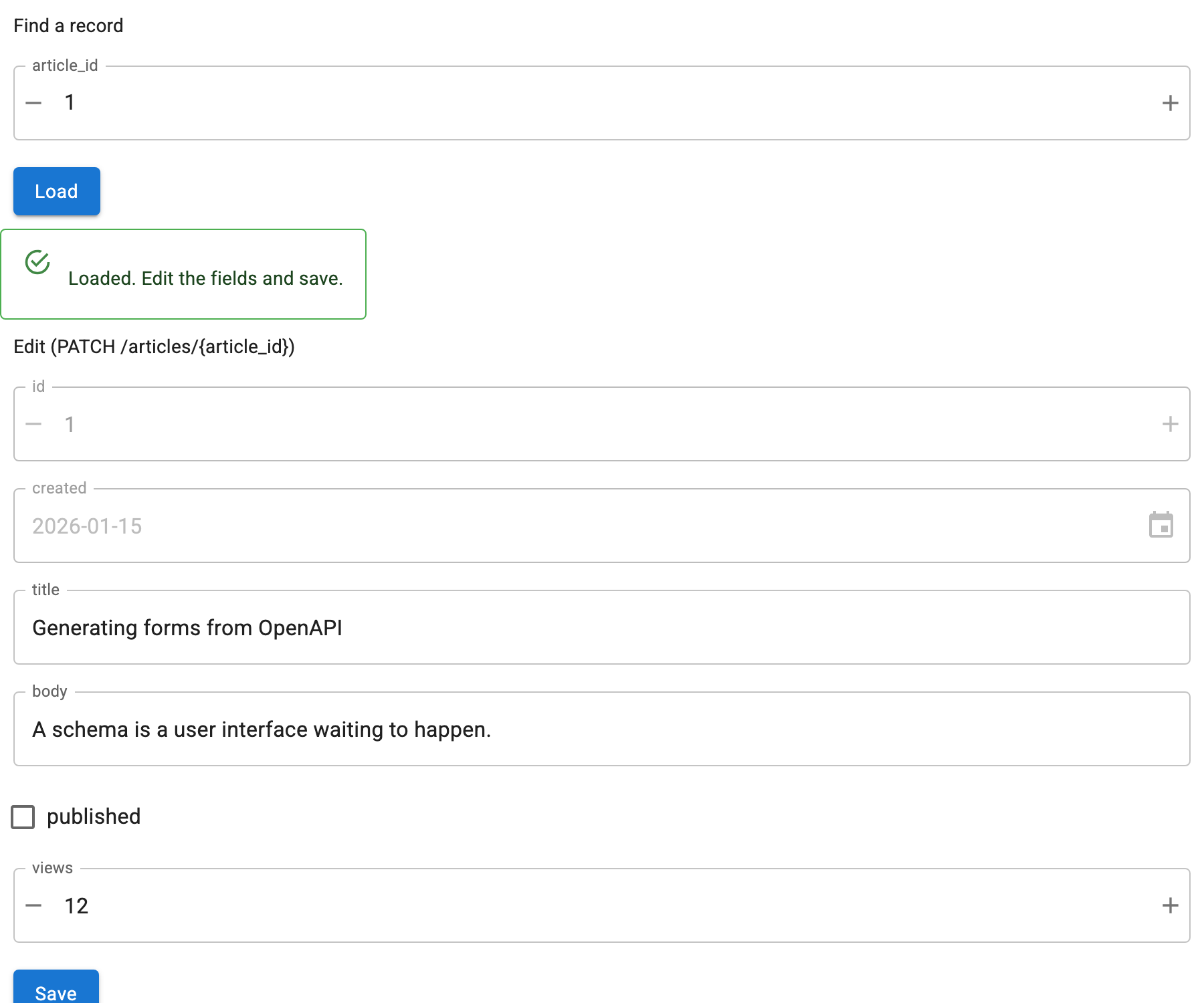
That renders a lookup form for GET /articles/{article_id} with a Load
button, and below it an edit form for the update operation with a Save
button. Load fetches the record and populates the edit form; Save sends it back.
Finding the update operation
The path is searched for an update operation, preferring PATCH, then PUT,
then POST. The read method is never treated as the update, even when the read
is itself a POST.
The resolved method is always displayed in the edit form's heading, because
POST on a path means "update this" in some APIs and "create a subresource" in
others, and a heuristic you cannot see is worse than none. Override it when the
guess is wrong:
To check what is available before deciding:
from panel_openapi import find_update_operations

find_update_operations(spec, "/articles/{article_id}")   # ["patch", "put"]
If there is none, editor.editor is None and the editor says so instead of
rendering a Save button that cannot work.
What gets sent
This is the part worth being certain about:
PATCHsends only the fields that differ from the loaded record. That is what a partial update means: an omitted key is left alone. If nothing differs, nothing is sent.PUTandPOSTsend the full body, since they replace the resource.readOnlyfields are never sent, under any method. They are shown disabled so you can see theidand the timestamps without being able to break them.
Complete example
"""Look up a record, edit it, and send the changes back."""

import panel as pn
import panel_material_ui as pmui

from panel_openapi import OpenAPIRecordEditor

pn.extension()

SPEC = {
    "openapi": "3.1.0",
    "info": {"title": "Articles", "version": "1.0.0"},
    "paths": {
        "/articles/{article_id}": {
            "parameters": [
                {
                    "name": "article_id",
                    "in": "path",
                    "required": True,
                    "schema": {"type": "integer"},
                }
            ],
            "get": {
                "summary": "Get an article",
                "responses": {
                    "200": {
                        "description": "The article.",
                        "content": {"application/json": {"schema": {"$ref": "#/components/schemas/Article"}}},
                    }
                },
            },
            "patch": {
                "summary": "Update an article",
                "requestBody": {"content": {"application/json": {"schema": {"$ref": "#/components/schemas/Article"}}}},
                "responses": {"200": {"description": "The updated article."}},
            },
        }
    },
    "components": {
        "schemas": {
            "Article": {
                "type": "object",
                "properties": {
                    # readOnly fields are shown disabled and never sent.
                    "id": {"type": "integer", "readOnly": True},
                    "created": {"type": "string", "format": "date", "readOnly": True},
                    "title": {"type": "string"},
                    "body": {"type": "string"},
                    "published": {"type": "boolean"},
                    "views": {"type": "integer", "minimum": 0},
                },
            }
        }
    },
}

editor = OpenAPIRecordEditor(
    SPEC,
    base_url="https://api.example.com",
    path="/articles/{article_id}",
    # PATCH is picked automatically; pass update_method to override.
    confirm=True,
)
editor.lookup.widgets["article_id"].value = 1

# Normally you would click Load; this stands in for a live server.
editor.populate(
    {
        "id": 1,
        "created": "2026-01-15",
        "title": "Generating forms from OpenAPI",
        "body": "A schema is a user interface waiting to happen.",
        "published": False,
        "views": 12,
    }
)

pmui.Column(editor, sizing_mode="stretch_width").servable(title="Record editor")
Driving it from code
Set show_lookup=False to hide the lookup form and drive it yourself:
editor = OpenAPIRecordEditor(spec, base_url=..., path=..., show_lookup=False)

record = await editor.load(article_id=1)     # fetch and populate
editor.editor.widgets["title"].value = "A new title"
saved = await editor.save()                  # returns the server's version
load raises ValueError for a lookup field the read operation does not
declare, rather than silently ignoring it. If you already have the record, skip
the fetch:
populate also sets the baseline that a PATCH diffs against.
Inspecting pending changes
diff covers every editable location, not just the body, and reports (old,
new) per field. editor.record is the record as last loaded or saved, and
editor.loaded says whether there is one.
After a successful save the server's version of the record is adopted, so the
PATCH baseline stays accurate and any server-side changes become visible.
Confirming before saving
confirm=True puts a dialog listing the pending changes in front of the save:
Each change is shown as old → new, with the method and path that will be used.
Long values are truncated. Cancel sends nothing. Note that save() bypasses the
dialog, which is wired to the Save button, so calling it from code always saves.
Save is enabled by an edit
Save starts disabled and enables as soon as a record is loaded or any editable
field is touched. Touching a readOnly field does not enable it, since that
cannot produce anything worth sending. Editing without loading first is allowed:
a PATCH of a couple of fields is perfectly valid without reading the record.
Shared path parameters
Both operations sit on the same path, so both declare e.g. article_id. When the
lookup form is shown, the edit form's copy is hidden and the value is carried
across on save, rather than asking twice and letting the two disagree. With
show_lookup=False the edit form shows it, since nothing else would ask.
Related
- Read and Submit Values for the underlying form API
examples/08_patch_editor.pydisplays everyPATCHbody a local FastAPI app receives, which is the way to see the diff semantics for yourself