Understand Widget Mapping
Every widget is chosen from the field's schema. The rules below are the whole of it, so you can predict what a form will look like by reading the document, and adjust the document when you want something different.
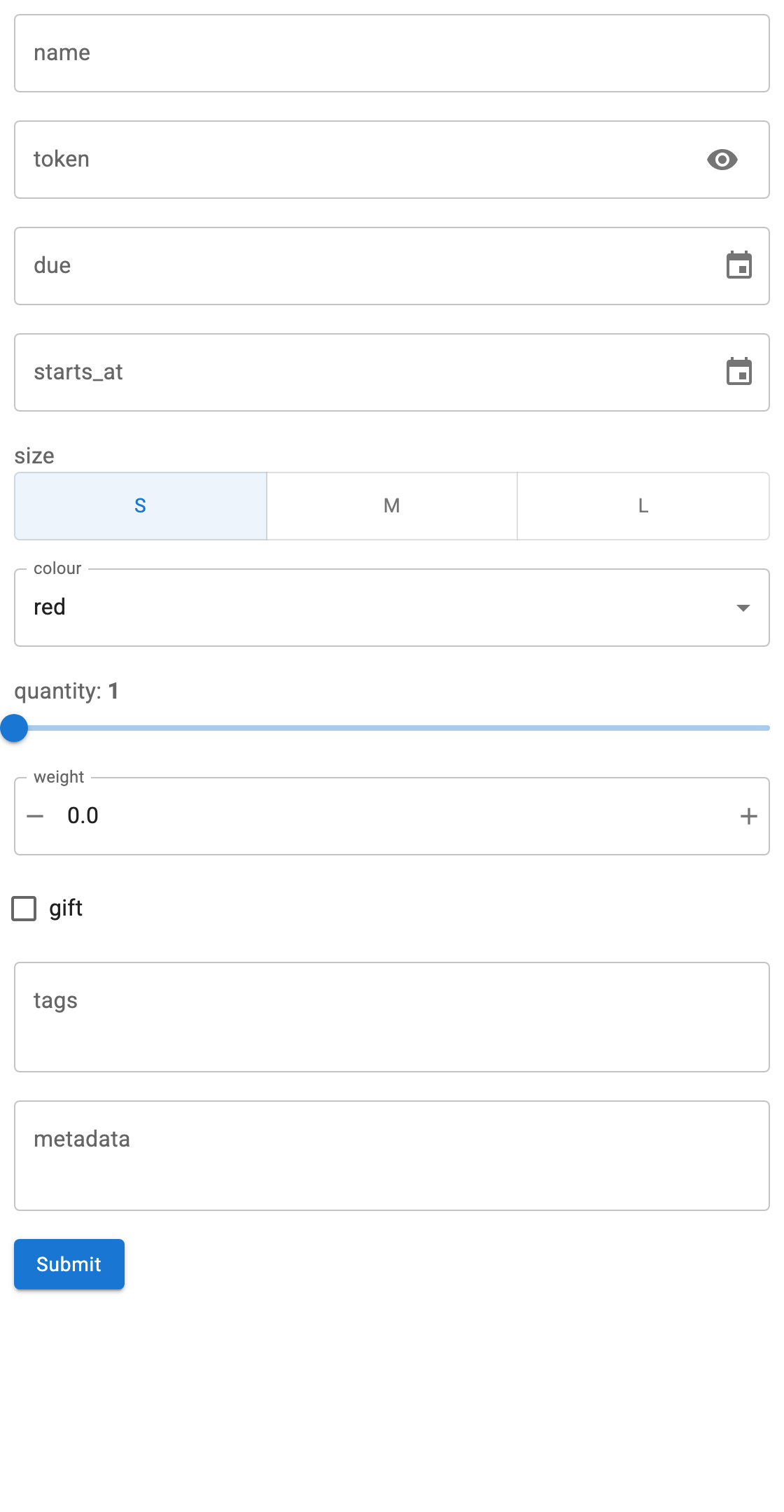
The rules
Applied in order; the first match wins.
| Schema | Widget |
|---|---|
enum with 3 or fewer values |
RadioButtonGroup |
enum with more than 3 values |
Select |
string, format: password |
PasswordInput |
string, format: date |
DatePicker |
string, format: date-time |
DatetimePicker |
string |
TextInput |
integer with both minimum and maximum |
IntSlider |
integer with one bound or none |
IntInput |
number with both minimum and maximum |
FloatSlider |
number with one bound or none |
FloatInput |
boolean |
Checkbox |
array whose items have an enum |
MultiChoice |
Anything else, including object and free-form arrays |
TextAreaInput holding JSON |
enum is checked before type, so an enum of integers still gets a
RadioButtonGroup or Select.
A form showing all of them
"""One property per widget kind, to show how schemas map to widgets."""

import panel as pn

from panel_openapi import OpenAPIForm

pn.extension()

SPEC = {
    "openapi": "3.0.0",
    "info": {"title": "Widget mapping", "version": "1.0.0"},
    "paths": {
        "/post": {
            "post": {
                "summary": "Every widget kind",
                "requestBody": {
                    "content": {
                        "application/json": {
                            "schema": {
                                "type": "object",
                                "properties": {
                                    # string -> TextInput
                                    "name": {"type": "string"},
                                    # format: password -> PasswordInput
                                    "token": {"type": "string", "format": "password"},
                                    # format: date -> DatePicker
                                    "due": {"type": "string", "format": "date"},
                                    # format: date-time -> DatetimePicker
                                    "starts_at": {"type": "string", "format": "date-time"},
                                    # enum, <= 3 options -> RadioButtonGroup
                                    "size": {"type": "string", "enum": ["s", "m", "l"]},
                                    # enum, > 3 options -> Select
                                    "colour": {
                                        "type": "string",
                                        "enum": ["red", "green", "blue", "black"],
                                    },
                                    # integer, both bounds -> IntSlider
                                    "quantity": {
                                        "type": "integer",
                                        "minimum": 1,
                                        "maximum": 10,
                                    },
                                    # number, one bound -> FloatInput
                                    "weight": {"type": "number", "minimum": 0.0},
                                    # boolean -> Checkbox
                                    "gift": {"type": "boolean"},
                                    # array of enum -> MultiChoice
                                    "tags": {
                                        "type": "array",
                                        "items": {"type": "string", "enum": ["new", "sale"]},
                                    },
                                    # object, or anything unrecognised -> JSON TextAreaInput
                                    "metadata": {"type": "object"},
                                },
                            }
                        }
                    }
                },
                "responses": {"200": {"description": "ok"}},
            }
        }
    },
}

form = OpenAPIForm(SPEC, base_url="https://postman-echo.com", path="/post", method="post")

form.form.servable(title="Widget mapping")
What carries over from the schema
titlebecomes the widget label, falling back to the field name.descriptionbecomes the widget's description, shown as a tooltip. For a parameter this is read from the parameter itself, which is where OpenAPI puts it; for a body property, from its schema.defaultbecomes the initial value.minimum/maximumbound the numeric widgets, and decide slider or spinner.requiredis recorded on the widget'stags, and drives submit validation.readOnlydisables the widget and excludes the field from the request.
Nullable fields
An optional value is often written as a union with null, which would otherwise land in the "anything else" row and get a JSON text area. A union with exactly one non-null branch is unwrapped to that branch, so it gets a real widget:
# OpenAPI 3.1, and what pydantic emits for `str | None`
{"anyOf": [{"type": "string"}, {"type": "null"}]}   # -> TextInput

# OpenAPI 3.0
{"type": "string", "nullable": True}                # -> TextInput

# A genuine union is left alone
{"anyOf": [{"type": "string"}, {"type": "integer"}]}  # -> JSON TextAreaInput
This matters most for PATCH request models, where nearly every field is
optional.
Free-form arrays
An array of arbitrary strings becomes a JSON text area rather than a
MultiChoice, because MultiChoice cannot accept a value outside its options.
Give items an enum when you want the picker:
# JSON text area: type ["a", "b"] yourself
{"type": "array", "items": {"type": "string"}}

# MultiChoice with two options
{"type": "array", "items": {"type": "string", "enum": ["new", "sale"]}}
JSON text areas are parsed on submit. Invalid JSON is reported and nothing is sent.
Changing what you get
The widget follows the schema, so the way to change the widget is to change the
schema, e.g. adding format: date to a string or bounds to an integer. When the
document is not yours to change, or you want something the mapping does not
offer, build the form yourself; schema_to_widget is public
and usable field by field.