Quickstart
Build a working form for one API operation. By the end of this page you will have a form whose widgets came from a schema, and which issues a real request when you submit it.
Install
Minimal app
OpenAPIForm needs three things: a specification, a base URL, and the operation
to target as a path and method.
"""Quickstart: a form for one operation of an inline spec."""

import panel as pn

from panel_openapi import OpenAPIForm

pn.extension()

SPEC = {
    "openapi": "3.0.0",
    "info": {"title": "echo demo", "version": "1.0.0"},
    "paths": {
        "/post": {
            "post": {
                "summary": "Create a user",
                "requestBody": {
                    "required": True,
                    "content": {
                        "application/json": {
                            "schema": {
                                "type": "object",
                                "required": ["name"],
                                "properties": {
                                    "name": {"type": "string", "title": "Name"},
                                    "role": {
                                        "type": "string",
                                        "enum": ["admin", "user", "guest"],
                                        "default": "user",
                                    },
                                    "age": {"type": "integer", "minimum": 0, "maximum": 120},
                                    "subscribed": {"type": "boolean", "default": True},
                                },
                            }
                        }
                    },
                },
                "responses": {"200": {"description": "The echoed request."}},
            }
        }
    },
}

form = OpenAPIForm(SPEC, base_url="https://postman-echo.com", path="/post", method="post")

form.servable(title="Quickstart")
Run
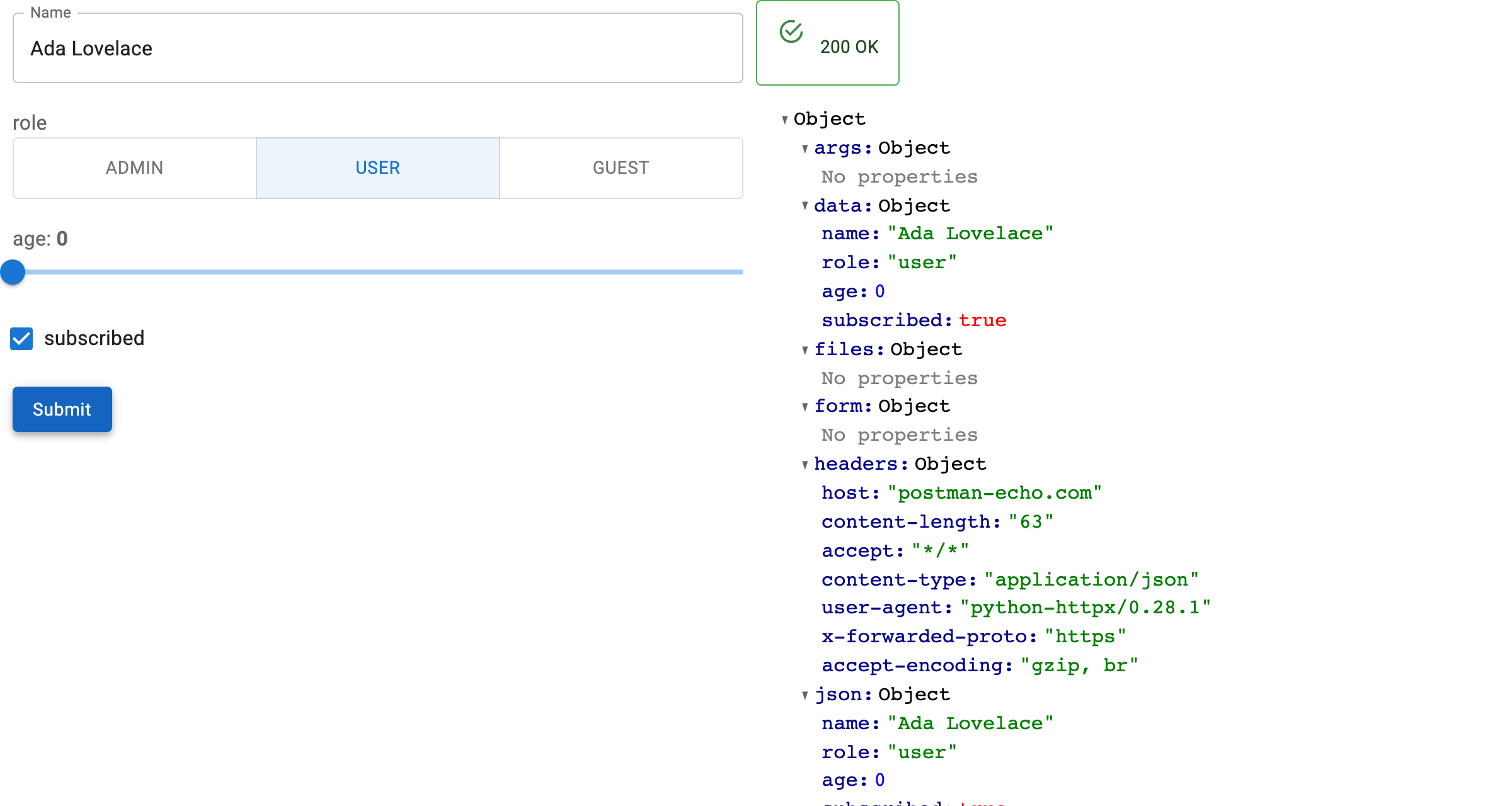
Fill in Name and press Submit. The form issues the POST, and the response
appears beside it.
What the schema decided
Nothing above says which widget to use. Each one came from the schema:
| Property | Schema | Widget |
|---|---|---|
name |
{"type": "string"}, and in required |
TextInput, empty submit is refused |
role |
enum of three values |
RadioButtonGroup |
age |
integer with minimum and maximum |
IntSlider |
subscribed |
{"type": "boolean", "default": true} |
Checkbox, checked |
The full mapping is documented separately →
Point it at a real spec
An inline dict keeps the example self-contained, but a URL works just as well:
form = OpenAPIForm(
    "https://petstore3.swagger.io/api/v3/openapi.json",
    base_url="https://petstore3.swagger.io/api/v3",
    path="/pet/{petId}",
    method="get",
)
Next steps
- Build a Form covers required fields, JSON bodies and errors.
- Load a Specification covers FastAPI apps and remote specs.
- Edit Records goes from submitting a form to editing a record.